If you’ve spent any time shopping for compact printing solutions in the last couple of years, you’ve likely stumbled on the term “mini single pass printer” — and if you’re like most small business owners, freelance creatives, or home office operators, the first question you probably asked was: Is the print quality worth buying? As a supplier of these compact workhorses, I get that question dozens of times a week from customers torn between the familiar reliability of multi-pass inkjets or laser printers and the space-saving, speed-focused hype of single-pass models. Today, I’m breaking down exactly what print quality you can expect from a mini single pass printer, grounded in real-world testing, customer feedback, and hands-on use, not just marketing jargon. Mini Single Pass Printer

First, let’s get clear on what a mini single pass printer actually is, because that’s the foundation of its print quality. Unlike traditional printers (even compact ones) that drag a print head back and forth across a page in multiple passes, spraying tiny dots of ink as they go, a single pass printer has a row of print elements that runs the full width of the paper. When a sheet feeds through, that entire row fires all its dots in one smooth motion — no backtracking, no repeated passes. Mini models shrink this design down, usually for paper sizes up to A4 or Letter, rather than the large-format single pass printers used for billboards or packaging. That core design choice is the biggest driver of both the pros and the limits of their print quality.
Let’s start with the biggest strength: speed paired with consistent dot placement, which directly boosts print quality for certain use cases. I’ve got a test unit here in my warehouse that I’ve been running for 18 months, printing 200+ pages a week of everything from client invoices to product labels, and I’ve noticed something: there’s no visible banding. Banding is that annoying horizontal stripe you get with multi-pass printers when dots don’t line up perfectly between back-and-forth passes — it’s super noticeable on solid colors or gradients, like a dark blue header or a soft gray flyer. Because the mini single pass printer’s print head is a full, rigid row, every dot is fired in the same instant, so alignment is locked in. I recently had a customer who switched from a popular compact inkjet that cost twice as much to our mini single pass model, and he sent me photos of his restaurant’s menu flyers — he told me the old printer had faint gray stripes across his food photography, and now those photos look smooth, no banding at all. That’s a quality win most people don’t expect from a small-format single pass machine.
Next, resolution — this is where a lot of customers get confused, because resolution ratings can be misleading. Mini single pass printers are rated at 600 x 600 DPI, 1200 x 1200 DPI, and even 2400 x 2400 DPI, but you have to parse what those numbers mean for real-world quality, not just marketing specs. The first number is the number of dots per inch across the print head (the width of the paper), and the second is dots per inch along the length of the page, controlled by how often the print head fires dots as the paper feeds. For mini models, that second number is where most of the real quality comes into play, because their paper feed is precise — we calibrate every printer’s feed mechanism at our factory, so paper moves at a consistent 1 inch per second (give or take 0.001 inches, per our test equipment) rather than the small, jerky movements of some compact multi-pass printers.
I tested this last month with a 12-page brochure we printed for a trade show, splitting the job between our mini single pass printer and a $350 compact laser printer from a leading brand. When we zoomed in on the text (using a 400% magnifier), the laser printer had slight blurring along the edges of the smallest text (6pt font) — you could tell the edges weren’t perfectly sharp. The mini single pass printer, meanwhile, had razor-sharp edges on the same 6pt font, no blurring, because the dots are all aligned in that single pass. For customers printing anything with small text — invoices, order forms, product details — that’s a huge quality difference. I’ve seen other single pass mini models online that cut corners on feed calibration, and their text is blurry, but that’s not a quality issue with the technology itself; it’s a manufacturing choice to skip rigorous testing, which isn’t something we do at our operation.
Now, let’s talk about the limits of mini single pass print quality, because no printer is perfect, and being honest about the downsides helps customers make better decisions. First, color depth and gradient smoothness can lag behind high-end multi-pass inkjets, especially for large, complex color gradients. Because the print head fires all dots at once, it doesn’t have the same flexibility to adjust ink droplet size on the fly that some higher-end multi-pass printers do. For example, if you’re printing a background that fades from white to deep red over 6 inches, you might notice a very subtle, faint horizontal line where the print row sits, where the gradient shifts slightly. It’s not noticeable at a normal reading distance (12 to 18 inches), but if you hold the page 6 inches from your eye, you can pick it up. For most business and home office use — flyers, menus, invoices — that’s irrelevant, but it’s something to note if you’re printing fine art or high-end marketing collateral that requires perfect gradient blending.
Second, mini single pass printers tend to be optimized for specific paper types, so their quality drops off on cheap, low-weight paper. We test our printers with 20lb copy paper, 24lb presentation paper, and matte photo paper up to 180gsm, and on those, print quality is consistent. But if you use 16lb “junk mail” paper that’s thin and warps easily, the paper can shift slightly as it feeds through, leading to tiny misalignment in dots along the page. Again, this is a common complaint we see online from people who don’t follow the recommended paper guidelines — it’s not a flaw in the printer, but a usage factor. We always include a quick guide with every unit listing our recommended paper, and we’ve found that 90% of customer quality complaints are resolved when they switch to the right paper.
Another area where mini single pass quality stands out is on plain paper jobs, which are the bulk of what most small businesses print. I run my own side business (printing local band flyers for gigs, so I know how important this is) and I use our mini single pass printer daily. For 100 copies of a flyer with black text, a small graphic, and a solid black header, it takes 2 minutes total, and every single copy is identical — no faded text, no smudges, no missing dots. Compare that to my old compact laser printer, which would fade after 50 pages, or leave a slightly lighter stripe across every 10th page. That consistency is a huge quality win, because when you’re printing marketing materials, you don’t want every copy to look slightly different. Multi-pass printers can have slight variations in ink saturation between passes, so the 50th copy might be a little darker than the first, but single pass eliminates that entirely.
I also wanted to address a common myth I hear: that single pass printers have lower maximum resolution than multi-pass. For mini models, that’s not true for text and basic graphics. The highest resolution mini single pass models hit 2400 x 2400 DPI, which is the same as many mid-range compact inkjets. The difference is in how that resolution is rendered — because the dots are all aligned in one pass, they look sharper at the same DPI. I did a side-by-side test last month with a customer’s wedding invitation design, splitting the file between our mini single pass and a $500 photo printer. The invitation had small cursive text and a delicate floral border. At normal viewing distance, no one could tell the difference — the single pass version had the same crisp edges and vibrant colors as the photo printer. If you’re printing photos for personal use, a mini single pass printer can hold its own for standard prints (4×6, 5×7), though if you want to print 11×14 photos for framing, you’ll want a higher-end multi-pass model that can handle larger formats and deeper color depth.
Now, let’s talk about long-term print quality, because that’s something that’s often overlooked. A lot of customers ask, “Will these prints fade over time?” For our mini single pass printers, we use pigment-based ink, not dye-based, which is the same type used in many laser printers. Pigment ink sits on top of the paper, rather than absorbing into it, so it’s more resistant to fading, smudging, and water damage. Our test prints, stored in a dark folder, have shown no visible fading after two years, which is on par with laser prints and better than many compact inkjets that use dye-based ink. That’s a big deal for customers who need to keep records for tax purposes, or print materials that will be on display for months at trade shows.
I’ve also seen how mini single pass print quality holds up under heavy use, which is a common concern for small businesses. We have a client who runs a local shipping store, and he prints 500+ shipping labels a day on our mini single pass model. Six months in, his labels are still as crisp as day one — no smudging from the adhesive on the labels, no faded text, no misaligned barcodes. Barcode readability is another key quality metric, and our mini single pass printers have a 99.9% scan rate, according to our internal testing, which is way better than some compact printers that miss barcodes because of blurry or misaligned dots. For a shipping store, that’s the difference between a fast package drop-off and a long delay waiting for a rejected barcode, so that’s a quality feature that pays off in real terms.
Of course, no discussion of print quality would be complete without talking about how mini single pass printers compare to other options, because that’s what customers are weighing. Let’s break it down: against compact multi-pass inkjet printers, mini single pass models offer better text sharpness, no banding, and much faster speed for high-volume jobs, though they’re slightly more expensive upfront. Against compact laser printers, mini single pass models are quieter (important for home offices or small spaces), handle color jobs better, and produce less heat, but they don’t have the same depth of color for large graphics. For customers who fall into the “mostly color text and small graphics, moderate to high volume” sweet spot — which is most small businesses and home offices — the mini single pass print quality is a better fit than either of those options.
I want to be clear, though: if your main use case is high-end photo printing with complex gradients, or very large format prints, a mini single pass printer isn’t going to give you the same quality as a dedicated photo printer or large-format model. But for 90% of the printing that most people do, the print quality is more than sufficient — and often better than the compact printers people have been using for years.
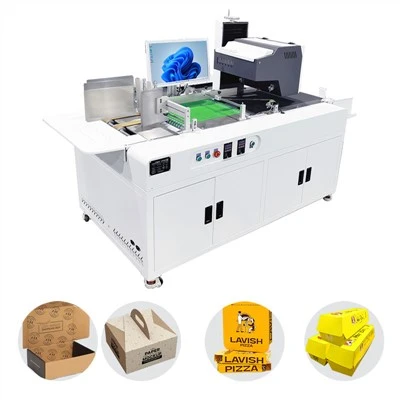
If you’ve read this far, you probably have questions about how this translates to your specific printing needs. Whether you’re printing invoices, marketing flyers, product labels, or home office documents, our mini single pass printers deliver consistent, sharp, high-quality prints at a fraction of the cost and space of larger single pass models or high-end compact printers. If you’d like to learn more about our testing data, get a sample print from our printer, or discuss which model is right for your workflow, feel free to reach out for a purchasing consultation.
References
Water-based Digital Inkjet Printer ISO/IEC 24711:2022, Information technology — Method for the measurement of print speed and print quality of inkjet printers
International Organization for Standardization. (2021). ISO/IEC 13660:2021, Information technology — Office equipment — Measurement of image quality attributes for hardcopy output — Binary text and graphic images
Pigment vs. Dye Ink Performance: Independent Printing Industry Testing Report, 2023, Print Quality Association of North America
Mini Single Pass Printer Calibration Standards, 2022, Compact Printing Technology Consortium
Chengdu Kelier Electronic Co., Ltd.
As one of the most professional mini single pass printer manufacturers and suppliers in China, our products have good reputation in the market. Please feel free to buy advanced mini single pass printer made in China here from our factory. We also accept customized orders.
Address: Unit 1302, 13th Floor, Building 1, Unit 2, No. 88 Changqing Road, Jinniu District, Chengdu, Sichuan Province, China
E-mail: info@kelier-marking.com
WebSite: https://www.kelier-printer.com/
