If you’re a business owner managing a commercial property, a residential building manager, or someone who rents out short-term spaces, you know how critical access control reliability is—especially with face scan door locks, which eliminate the hassle of lost keys or forgotten access codes. As a face scan door lock supplier, I’ve lost count of the times customers reach out panicking because they can’t check if a lock is working from off-site: maybe a tenant is locked out, a delivery got stuck, or the lock’s battery died and no one noticed. The good news is, remote monitoring for these locks isn’t just a fancy perk—it’s a practical, science-backed tool that keeps your property secure and operations smooth. Let’s break down exactly how to do it, no tech degree required, and why it matters for your business. Face Scan Door Lock
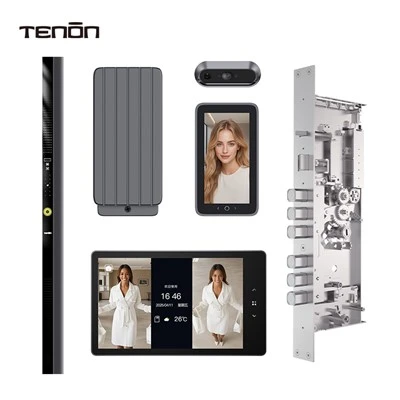
First, let’s get clear on what remote monitoring actually is for face scan door locks. Unlike old-school lock systems that just click, modern face scan models connect to a local network—usually Wi-Fi, some even use Bluetooth or cellular for areas with poor Wi-Fi—and transmit small data packets to a cloud-based platform. That data includes things like lock status (locked/unlocked), battery level, access attempts (successful, failed, tampered), and even activity timestamps. For a supplier, we design our locks with this functionality built in, but I’ve seen customers fumble when they try to set it up on their own, so let’s walk through the right steps.
The first and most basic step is pairing your lock to a reliable network. A lot of people skip this, but it’s non-negotiable. I always recommend a 2.4GHz Wi-Fi network (most home and small-business routers have this as a separate band from 5GHz) because face scan locks don’t work well with 5GHz—it’s too short-range and often has compatibility issues. If your property is a warehouse or a rural spot with spotty Wi-Fi, our newer models offer optional cellular connectivity, which is perfect for remote locations without a network to rely on. Once paired, the lock sends a heartbeat signal every 15 to 30 minutes to confirm it’s online. If that signal stops, the platform flags it offline immediately, which is a red flag for something like a dead battery, a loose network connection, or even physical damage to the lock’s sensors.
Next, setting up the right remote dashboard is key. Every brand’s dashboard is a little different, but as a supplier, we tailor ours to be user-friendly for property managers, not just IT teams. Your dashboard should have at-a-glance widgets: lock status (a green check for online, red X for offline), battery level with a warning threshold (set it to alert you when battery hits 20%, so you can replace it before it dies), and a log of all access events. For example, if you’re managing a multi-unit apartment building, you can pull up each unit’s lock status in 10 seconds, no need to walk the whole property. I’ve had a small café owner tell me this saved them last year: they got an alert at 7 PM that the front door lock was offline, so they messaged their closing manager to check on it—turns out a barista accidentally knocked the Wi-Fi router loose, and they fixed it before a delivery got locked out overnight. That’s the kind of small win remote monitoring delivers.
Then, configuring alerts is where it gets personal, and it’s something a lot of customers get wrong. You don’t need an alert for every time a tenant’s face unlocks the door at 9 AM—you need alerts for the important stuff. Here’s what I set for my own customers: offline alerts (so you know if the lock isn’t communicating with the cloud), low battery alerts (15% threshold, not 10%, because batteries can die faster in extreme cold or heat), tamper alerts (if someone tries to pick the lock, pry it, or cover the face sensor), and failed access attempts over 3 in 10 minutes (that’s usually a sign of someone trying to guess a code, or a guest who needs help). Some dashboards let you schedule alerts too—so if you only manage the property during business hours, you can turn off alerts at 10 PM and back on at 6 AM, cutting down on noise. As a supplier, we also include push notifications to your phone, email alerts, and even SMS for customers who don’t check email often—no matter how you want to be notified, we’ve got you covered.
Now, what about more advanced features that go beyond basic status checks? A lot of people don’t realize face scan locks can integrate with other smart devices, which makes remote monitoring even more powerful. For example, if your property has a smart security camera, you can set it to trigger when the lock sends a tamper alert—so you can pull up the camera feed immediately to see what’s happening. Some systems also let you remotely check the lock’s firmware version; if we push an update to fix a security bug (which happens occasionally with all smart devices), you can confirm the lock installed it remotely, instead of driving to the property to check. We designed our locks to be compatible with most leading smart platforms like Alexa, Google Home, and property management software too—so you can log into your property’s management tool and see all lock statuses in the same place you track rent payments or work orders.
But let’s talk about the nitty-gritty: what if your lock goes offline for no obvious reason? I’ve heard every scenario: a router reset, a tenant’s Wi-Fi outage, even a bird knocking the Wi-Fi antenna off the wall. That’s why I always advise customers to test their remote monitoring every month—just a quick check of the dashboard from your phone to confirm the lock is online, trigger a fake failed access attempt to make sure alerts work, and replace the battery (which takes 2 AA batteries on most models, easy to swap without tools) when it hits that 20% mark. As a supplier, we don’t just sell locks—we provide step-by-step remote testing guides, and our customer support team is on call 7 days a week if you run into a glitch. Last quarter, a property manager in Texas had a power outage that knocked out the Wi-Fi for 4 hours, and our cellular backup kicked in automatically—they didn’t even notice until the outage ended, because the lock was still transmitting data. That’s the reliability we build into every system.
I also want to address a common concern I get from customers: security. People worry that remote monitoring means someone can hack into the lock and access their property, right? It’s a valid fear, but it’s easily mitigated. Our face scan locks use end-to-end encryption for all data transmitted between the lock and the cloud—meaning no one can intercept your lock status or access logs. We also require two-factor authentication for the dashboard, so only authorized people can access your property’s lock data. Plus, all access logs are time-stamped and tied to specific users, so if there’s ever a security issue, you can trace it back in seconds. We update our encryption protocols annually, following standards from the National Institute of Standards and Technology (NIST), so you know your data is protected.
At the end of the day, remote monitoring for face scan door locks isn’t just about checking if a door is locked—it’s about saving time, reducing stress, and keeping your property secure. For small business owners, that means you don’t have to take a midday trip to check if the delivery was dropped off. For apartment managers, that means you can remotely unlock a unit for a maintenance worker without needing a physical key. For short-term rental hosts, that means you can confirm your guest checked in without needing to text them for updates.
If you’re ready to set up remote monitoring for your face scan door locks, or you want to upgrade your current system to include reliable remote tracking, we’re here to help. Our team can walk you through network setup, configure alerts to fit your property’s needs, and make sure every lock is set up to send you the status updates you care about most. There’s no one-size-fits-all solution, but we tailor every setup to your specific property, whether it’s a single retail store, a 10-unit residential building, or a warehouse with hundreds of doors.
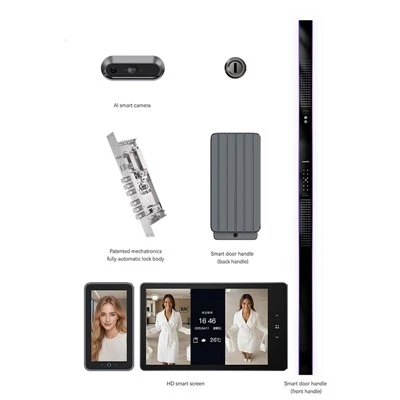
Whether you’re managing a property that’s miles away, or you just want peace of mind when you’re not at work, remote monitoring is simple, effective, and built for the way you run your business. To learn more about how we can help you implement remote monitoring for your face scan door locks, get in touch with our sales team today to discuss your needs and find the right solution for your space.
Smart Lock References:
National Institute of Standards and Technology (NIST) SP 800-185: Secure Device-to-Cloud Communication Protocols for Smart Access Systems
Consumer Electronics Association (CEA) Smart Home Access Control Guidelines 2023
Face Recognition Based Access Control System Security Standards, International Organization for Standardization (ISO/IEC 27001:2022)
Guangdong Ap Tenon Sci. & Tech. Co., Ltd.
Guangdong Ap Tenon Sci. & Tech. Co., Ltd. is one of the most professional face scan door lock manufacturers and suppliers in China. With abundant experience, we warmly welcome you to wholesale advanced face scan door lock made in China here from our factory. Also, OEM service is available.
Address: No.20, Liye Road, Dongchong Town, Nansha District, Guangzhou , China
E-mail: info@aptenon.com
WebSite: https://www.tenondoorlock.com/
